Whereas the pzsubmit button submits the form, pzjsbutton executes custom JavaScript code that you supply. You’ll need to be comfortable with a bit of programming to make good use of this block.
When you configure the pzjsbutton, one of the key fields in the inspector controls panel is the textarea where you can insert your code. Whatever this code is, it will be executed when the button is pressed.
A side note about security: because the code is sent to the user’s browser, a malicious user could arbitrarily change the code within their own browser (this has no effect on anyone else who is viewing this page). They can then cause whatever they want to happen in their browser, but this is of course always the case with JavaScript and one’s own browser. It’s always the case, of course, that a user can run arbitrary JavaScript in their own browser, so this isn’t a security issue per se. Just note that you can’t trust that it was the code you intended that ran at the browser. So you should always check that all the fields submitted with your form are benign (you should be doing this anyway. Data that’s stored in PeakZebra tables is automatically sanitized).
Let’s say you want to take the data a user has typed into a text field and, when a button is pressed, take that value and append it to any text that’s already there in a textarea field.
When you create your text field, you need to give it a unique name, because this is how you’ll locate the field and its data in the form.
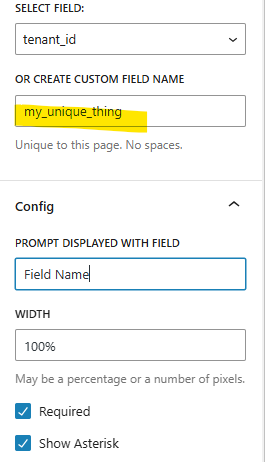
You give a different (unique) name to the textarea field.
When the button is pressed (on the front end), the onclick event triggers your JavaScript. Here’s code that does what we’ve been discussing — it grabs the value from the “my_unique_thing” field and appends it (on a new line) in the textarea (here the fields are named “field_name” and “table_description”):
const fieldValue = document.querySelector('input[name="field_name"]').value;
const tableDescField = document.querySelector('textarea[name="table_description"]');
if (tableDescField) {
    // Add a newline if the field isn't empty, then append the new value
    tableDescField.value = tableDescField.value + (tableDescField.value ? '\n' : '') + fieldValue;
} else {
    alert('Table description field not found');
}
Whatever happens with your JavaScript buttons during a user session, the submitted form will be handled as usual, including any “submit.php” file that you’ve created for processing the form using custom PHP code.


